


What is a DAM system?
Last updated: October 2026
Digital Asset Management explained
A DAM system (Digital Asset Management) is a central platform for managing, finding and sharing digital media such as product images, videos, graphics and documents. It connects files with descriptive information, versions, approvals and usage rights.
For manufacturers and retailers, this means sales, marketing and e-commerce teams can work from the same approved media library. A product image can be assigned to the right item and supplied in an appropriate variant to a shop, trading partner or catalogue workflow.
What is a media asset?
A media asset is a digital media file with a defined purpose, such as a product photo, assembly instructions, a brand logo or a video. Context such as item number, language, version and usage rights makes it possible to reuse the file reliably.
The terms DAM and MAM (Media Asset Management) sometimes overlap. Specialised MAM or VAM solutions may focus on audiovisual production workflows. The file types and processes a system supports matter more than the label.
What is managed in the DAM system?

Image
From Windows Bitmap (BMP) to Encapsulated Postscript (EPS, EPSF, EPSI, EPT) to GIF, JPEG, JPG, PSD, PTIF, TIFF and TIF.
Graphic
From Adobe Illustrator (AI) to Adobe InDesign CS/CS2/CS3/CS4 (INDD) and QuarkXPress (QXP).
Video
From AVI to Flash Video (FLV), Windows Media Video (WMV), QuickTime (MOV, MP4), Video Object (VOB), MPEG-4 and many more.
Audio
From MP3 to PCM, WAV, AIFF or DSD, FLAC, ALAC, MQA and WMA.
Documents
From Microsoft (DOC, PPT/PPS, XLS, XLW) to PDF and Apache OpenOffice (ODP, ODS, ODT).
3D model
From COLLADA to FBX, gLTF, OBJ and STL.
When do you need a DAM system?
A DAM becomes relevant when files exist but cannot reliably be found, checked or distributed in daily work. File count alone is not decisive. Consider how many teams, markets, partners and channels use the same assets.
- Marketing and e-commerce teams repeatedly search for the current product image or recreate the same output formats.
- Product management and sales need different language versions, data sheets or instructions for the same item.
- Trading partners receive files by email or changing download links, making approvals and currency difficult to track.
- Agencies, photographers and translators supply files without consistent metadata, ownership or usage information.
What does a DAM system do?
The typical workflow runs from import through organisation and approval to delivery. Test the functions you need and supported formats with your own files.
- Central media management: import files in a structured way, identify duplicates and link related variants.
- Search and filters: find assets using item numbers, categories, tags and other metadata.
- Versions and approvals: track changes and identify which version is approved for each use.
- Roles and usage rights: control access and document licences or usage restrictions.
- Output variants: provide suitable resolutions, dimensions or formats for defined channels where processing is supported.
- Collaboration and distribution: comment on files, share with partners and deliver through interfaces to PIM, shop, CMS or publishing workflows.
Metadata: making files discoverable
Metadata describes a file and its context. Technical details such as format, size or resolution may come from the file itself. Descriptive information such as product category, subject, language or campaign adds business context.
For manufacturers and retailers, product assignment, a clearly identified view, validity and approval status are particularly useful. An image labelled “front view, item 123, German, approved” is easier to use correctly than a file named “final_new_2.jpg”.
Define required fields, consistent vocabulary and responsibilities. Rights and licence information supports appropriate use, but a DAM does not replace checking the actual terms.
How can you organise your media assets in the DAM system?
TAGS
The media assets are provided with precise keywords (tags) and are indexed.
Categorisation
The media assets can be assigned to different categories or topics.
Structuring
The media assets can be stored in different folder structures.
Collections
Individual collections can be created regardless of the categories or folders.
DAM or PIM — and what about CMS, SharePoint and Dropbox?
DAM manages media; PIM manages structured product information such as attributes, variants and descriptions. Both come together in a product launch: the PIM holds materials and dimensions, while the DAM holds approved images and instructions. Reliable links help avoid assigning media to the wrong product.
A CMS focuses on publishing content. Document management and file-sharing tools may already meet storage and collaboration needs. Whether a DAM adds value depends on your requirements for search, metadata, versions, rights management, output variants and automated distribution.
Compare real workflows and the editions or extensions actually in use. A DAM should fill an identifiable gap and fit your existing system landscape.
How do you choose a DAM system?
Create a requirements list with users and IT. Ask vendors to demonstrate a complete workflow using your typical files. The related links below include a separate vendor comparison.
- Media and search: formats, previews, metadata model, filters and multilingual requirements.
- Collaboration: roles, approvals, versions, external partners and traceable changes.
- Integration: compatibility with PIM, ERP, shops and creative or publishing applications; documented interfaces and export options.
- Operations: hosting, access model, backups, recovery, support and required services.
- Future development: extensibility, updates, data portability and total licensing, implementation and operating costs.
Introducing a DAM: start with a focused scope
Start with a defined use case, such as approved product images for the shop and trading partners. This lets you validate everyday value before moving all assets and teams.
- Review the inventory: identify relevant files, versions, duplicates and existing usage information.
- Define the structure: agree metadata, product assignments, categories, ownership and approval rules.
- Migrate a pilot: import selected assets and test search, permissions, previews and output formats with users.
- Test integrations: verify updates and delivery to intended systems, including error cases.
- Support the rollout: train teams, establish ongoing ownership and add further assets gradually.
Costs, value and AI in Digital Asset Management
Beyond licensing or subscriptions, costs include storage, migration, metadata maintenance, interfaces, training and operations. Compare offers using consistent assumptions about users, data volume, partner access and integrations.
To assess value, measure search time, effort to create output variants, repeat file requests and the proportion of correctly tagged assets before and after the pilot. This provides a project-specific assessment rather than a generic ROI promise.
Depending on the solution, AI can suggest tags, recognise image content or support image editing. Assess quality, privacy, usage rights and required approvals with your own media. Automatically generated information or images should not be published without review.
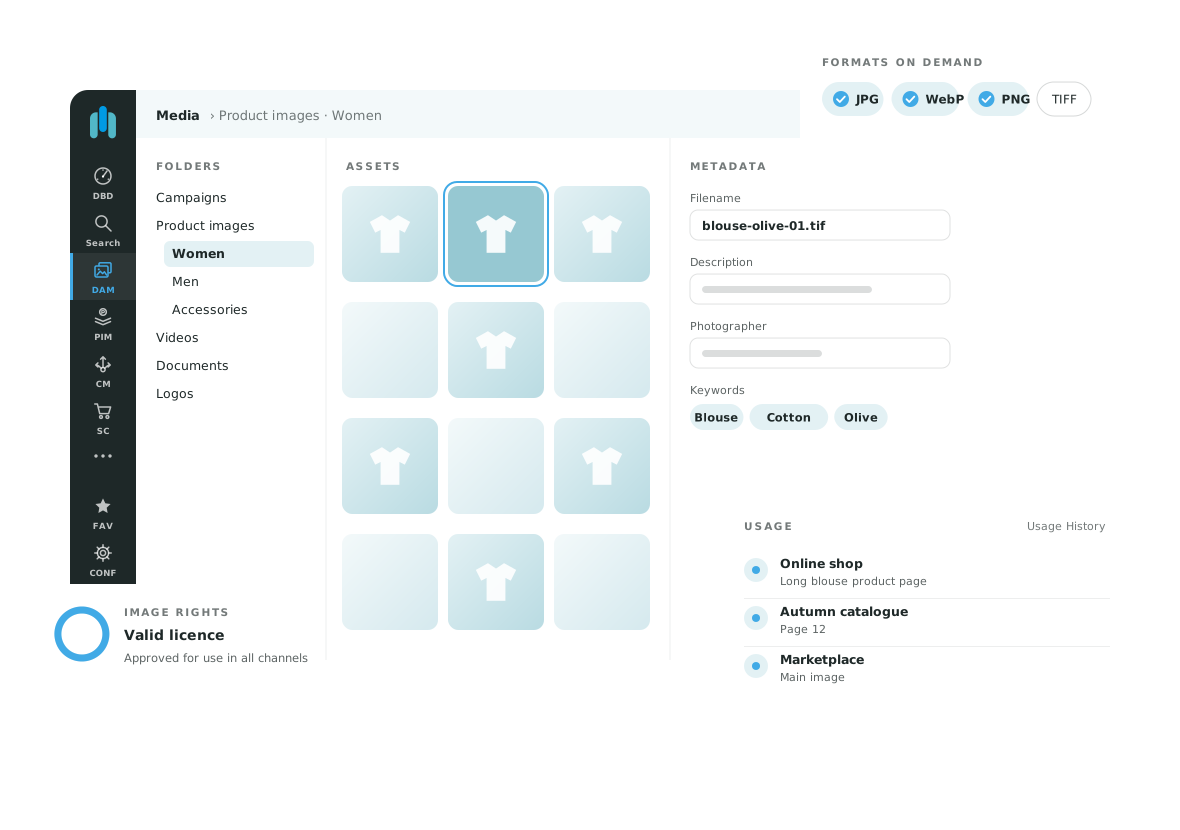
This is what the OMN DAM system looks like
Frequently asked questions about DAM systems
Who benefits from a DAM?
Teams using the same media across products, markets or channels that encounter problems with discovery, approvals or distribution. Workflows matter more than a fixed minimum number of files.
Can a DAM work with a PIM?
Yes, through interfaces or within an integrated platform. PIM and DAM can be used together in apollon OMN. The project defines which system supplies each type of data and how records are linked.
How long does implementation take?
This depends on the assets, metadata quality, integrations and project scope. A focused pilot reveals effort and outstanding questions. A generic timeline without this context is of limited use.
Is cloud storage enough?
It may be enough for basic storage and sharing. A DAM becomes useful when you also need focused media search, approvals, metadata, variants and controlled distribution.
Still questions?
#KnowledgeToGo: Everything you need to know about DAM
Is MAM the same as DAM? Tobias Marks brings light into the darkness. Concisely brought to the point, according to the motto #KnowledgeToGo!
The explanatory videos above are in German.
Explore the next step
Want to see how product data and media work together in OMN? Request a demo and tell us about your range, systems and channels. We will arrange an appointment with you.